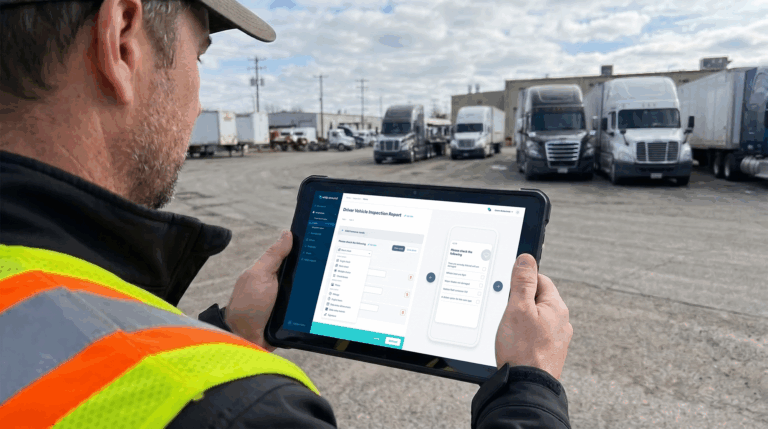
Most fleets that run an ELD assume the inspection box is already checked. The device handles Hours of Service, it came with a DVIR feature bundled in, and drivers tap through it every shift. Then a defect gets missed, a repair takes three extra days because nobody has a clear description of what’s wrong, or an auditor asks for a repair certification that doesn’t exist anywhere in the system. None of that means the fleet is doing anything wrong on purpose. It usually just means the bundled DVIR feature was built to satisfy a compliance checkbox, not to run a maintenance program.
The ELD and the DVIR solve two different problems, and treating them as one solved problem is where the gaps start. This article covers the real differences between ELD and DVIR systems, when a bundled DVIR feature is genuinely enough, seven specific ways relying on it can hold a fleet back, and what a complete inspection and maintenance workflow looks like instead.
ELD vs. DVIR Systems: The Key Differences Fleet Managers Need to Know
An ELD and a DVIR serve two different regulatory purposes: an ELD automatically records a driver’s Hours of Service, while a DVIR documents a vehicle’s mechanical condition and any defects found during inspection. One tracks time behind the wheel. The other tracks whether the vehicle itself is safe to be on the road. A fleet can be fully compliant on one and still exposed on the other.
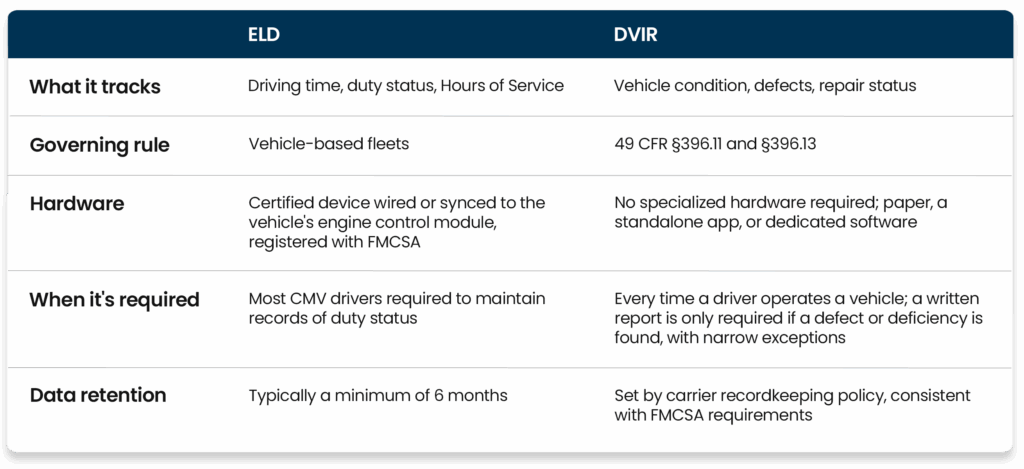
The key differences between ELD and DVIR systems come down to what each one is built to prove. An ELD proves a driver didn’t exceed their hours. A DVIR proves a vehicle was inspected and any defects were addressed. A bundled DVIR feature riding inside an ELD app can satisfy the letter of the rule without actually giving a fleet manager the detail needed to run maintenance well.
It’s also worth noting that the recordkeeping format itself isn’t the issue. FMCSA’s own regulation at 49 CFR §396.11 has been updated to explicitly confirm that DVIRs can be created and maintained electronically. Paper is still allowed, but a digital DVIR, whether it comes bundled with an ELD or through dedicated software, is fully compliant as a format. The gap fleets run into isn’t paper versus digital. It’s whether the digital tool captures enough detail to actually be useful.
When an ELD’s DVIR Feature May Be Enough
A bundled DVIR feature isn’t automatically a problem. It tends to hold up fine for fleets that fit a narrower profile:
A small, single-location fleet running one or two vehicle types, where a foreman or owner can personally verify equipment condition day to day without relying on inspection data alone to know what shape the fleet is in.
Operations where defects are rare and low-complexity, so a basic checkbox-and-signature process rarely gets tested against a serious mechanical issue or a dispute over when a repair actually happened.
Fleets with no non-vehicle equipment to track, since a bundled DVIR feature is typically built around vehicles only and has no real way to extend to trailers, generators, or other physical assets.
Operations that don’t need photo documentation for insurance, warranty, or dispute purposes, and are comfortable with a text-only defect note standing in for a full record.
Fleets that aren’t yet trying to connect inspection data to a formal preventive maintenance program, and are still scheduling service based on memory or a simple calendar reminder.
Outside of that profile, and especially for any fleet managing multiple vehicle types, multiple locations, or a maintenance program that depends on good data, the gaps below tend to show up quickly.
7 Ways Relying on Your ELD for Inspections Can Hold Back Your Fleet
1. It records form completion without proving the inspection happened
A driver can tap through every screen of a bundled DVIR without ever walking around the vehicle. The ELD has no way to confirm a tire was actually checked versus a box that was checked. That gap is exactly how defects get missed: not because the paperwork wasn’t filed, but because the inspection behind the paperwork never really happened. A fleet manager looking at a completed form has no way to tell the difference after the fact.
2. Generic checklists miss risks specific to your vehicles and assets
A one-size-fits-all inspection form built into an ELD rarely accounts for the specific wear points of a reefer unit, a wheelchair lift, a dump body, or specialized trailer equipment. Generic checklists catch generic problems. The asset-specific defect that causes a repeat breakdown is usually the one the form never asked about, because the form was built for a generic straight truck rather than the actual equipment in the fleet.
3. Weak defect reports slow down diagnosis and repair
A defect logged as “brake issue” with no photo and no detail sends a technician into a repair blind. Weak defect reports mean more time diagnosing the problem before a technician can even start fixing it, which turns a routine repair into a longer, more expensive one and keeps a vehicle out of service longer than it needed to be.
4. Reported defects do not automatically become accountable repair work
A basic DVIR feature can log that a defect exists without doing anything to make sure it gets fixed. Without an automatic path from defect to work order to completed repair, a reported issue can sit unaddressed, and nobody notices until the same problem causes a breakdown or shows up at a roadside inspection, at which point it’s no longer a maintenance decision but a violation.
5. Missed inspections and overdue defects remain hidden
If a driver skips an inspection or a repair never gets closed out, a bundled DVIR feature usually has no way to surface that gap to a fleet manager. Missed inspections and overdue defects stay invisible until something fails, which is precisely the kind of unnecessary downtime a maintenance program is supposed to prevent in the first place.
6. Sign-offs and compliance records become scattered across systems
Driver sign-offs live in one place, mechanic certifications in another, and any related maintenance history somewhere else entirely, often split across the ELD app, a separate maintenance spreadsheet, and a filing cabinet of paper repair invoices. When an audit or a roadside inspection requires pulling a complete record, incomplete records and scattered sign-offs turn a routine document request into a scramble.
7. Inspection data cannot improve maintenance decisions
Inspection data trapped inside an ELD rarely connects to a preventive maintenance schedule or a maintenance cost report. Without that connection, a fleet can’t spot a vehicle with a pattern of recurring defects or use inspection history to decide when a piece of equipment is genuinely due for replacement, not just another repair. The data exists, but it never gets the chance to inform a decision beyond the single trip it was collected on.
What a Complete ELD and DVIR Workflow Should Look Like
A complete workflow treats inspection and maintenance as one connected sequence instead of a form that gets filed and forgotten.
It starts with an asset-specific digital inspection, built for the actual vehicle or equipment being checked rather than a generic form. Any defect gets documented on the spot with a photo and a written note, not just a checkbox. That defect automatically generates a work order, so it’s routed to a technician instead of sitting in a log somewhere. The technician completes the repair, certifies the fix, and signs off digitally, closing the loop between “defect found” and “defect resolved.” The full record, inspection, defect, work order, and repair certification, lives in one place, searchable and audit-ready. And that same data feeds back into preventive maintenance scheduling and reporting, so inspection history actually improves future maintenance decisions instead of disappearing after the drive is over.
A DVIR built this way does more than satisfy a compliance requirement. It becomes the record a fleet manager actually uses to run maintenance.
Should You Replace Your ELD or Add Dedicated DVIR Software?
For most fleets, the answer isn’t replacing the ELD. It’s adding the inspection and maintenance layer the ELD was never built to provide.
The ELD should keep doing what it does well: tracking Hours of Service, duty status, and the engine and location data needed for HOS compliance and IFTA reporting. That’s the job it’s certified and registered with FMCSA to do, and there’s no reason to duplicate it elsewhere.
Dedicated DVIR software should handle everything the compliance-focused ELD wasn’t designed for: customizable inspection checklists built per asset type, photo and video defect documentation, automatic defect-to-work-order conversion, dual sign-off between driver and technician, centralized maintenance history and reporting, and coverage that extends to non-vehicle equipment like trailers, forklifts, and generators, not just road vehicles. Good telematics and maintenance integration means this layer works alongside the ELD’s data rather than duplicating it, pulling in engine hours or fault codes where useful without asking drivers to manage two disconnected systems.
How Whip Around Closes Inspection and Maintenance Gaps Left by an ELD
Whip Around isn’t built to replace a fleet’s ELD. It’s built to sit alongside it and cover the inspection and maintenance ground an ELD’s bundled DVIR feature usually can’t.
Fleet managers build customizable digital inspection forms specific to each asset type, whether that’s a tractor-trailer, a passenger vehicle, or a piece of non-vehicle equipment, and deploy them through the mobile app. Drivers document defects with photos and notes at the point of inspection, covering both pre-trip and post-trip inspections. A failed inspection item automatically generates a work order, so a defect has a clear path to a technician instead of sitting in a log. Dual sign-off between driver and mechanic closes the loop digitally, and the full inspection and repair history stays searchable in one place, which is what makes an audit or roadside inspection request straightforward instead of a scramble.
For fleets already running telematics, Whip Around connects with ELD and telematics providers including Geotab, Samsara, and Motive, so inspection and maintenance data sits alongside existing HOS and location data rather than living in a separate silo. That’s the same principle behind connected fleet systems: the ELD keeps handling compliance tracking, and Whip Around handles the inspection and maintenance record that compliance tracking alone was never meant to cover.
Connect Inspections, Repairs, and Compliance in One Workflow
An ELD and a DVIR were built to answer different questions, and a bundled feature that satisfies the letter of §396.11 doesn’t automatically give a fleet manager a usable maintenance record. The fleets that avoid missed defects, slow repairs, and surprise downtime are the ones that treat inspection, repair, and compliance as one connected workflow instead of three separate afterthoughts.
If your current DVIR process is just a checkbox inside your ELD, it’s worth seeing what a dedicated inspection and maintenance layer looks like in practice. Book a demo or start a free trial to see how Whip Around closes the gap between your ELD and a complete inspection workflow.
ELD and DVIR FAQs
Is an ELD the same as a DVIR system? No. An ELD tracks a driver’s Hours of Service and duty status. A DVIR documents a vehicle’s mechanical condition and any defects found during inspection. They’re governed by different regulations and serve different purposes, even when they’re sold as part of the same product.
Can drivers complete a DVIR through an ELD? In many cases, yes. Most ELD providers bundle a basic DVIR feature into their app so drivers can log inspections and defects from the same device they use for Hours of Service. How much detail that feature captures, photos, structured defect categories, repair sign-off, varies widely between providers.
Does using an ELD automatically make a fleet DVIR-compliant? Not by itself. Compliance under 49 CFR §396.11 and §396.13 depends on whether drivers are actually inspecting vehicles and defects are being documented and resolved, not just on whether a form gets submitted. Under the current rule, a written DVIR is only required when a defect or deficiency is found, with narrow exceptions for private non-commercial passenger carriers, driveaway-towaway operations, and motor carriers operating a single commercial vehicle. Every other driver still has to perform the inspection itself under §396.13, whether or not a defect ends up on paper. FMCSA has also confirmed that DVIRs may be created and maintained electronically, so a digital workflow satisfies the recordkeeping requirement as long as the inspection and documentation are real.
Do fleets need separate ELD and DVIR software? Not always. It depends on fleet size, how many asset types are in the mix, and how much detail the bundled DVIR feature already captures. Fleets with simple, low-complexity operations may find a bundled feature sufficient. Fleets managing multiple vehicle types, non-vehicle equipment, or a real preventive maintenance program typically outgrow it.
Can dedicated DVIR software integrate with an existing ELD? Yes. Whip Around, for example, integrates with telematics and ELD providers including Geotab, Samsara, and Motive, so inspection and maintenance data connects with a fleet’s existing HOS and location data rather than requiring a separate, disconnected system.