TL;DR: The fleet management software features that matter most are:
- digital inspections
- defect-to-work-order automation
- preventive maintenance scheduling
- telematics and GPS integrations
- compliance and document management
- parts and shop management
- fuel management
- reporting dashboards
- practical AI
GPS tracking tells you where assets are. The rest of the list keeps them safe, compliant and running. Look for one system where all of that data connects.
Plenty of fleets buy software for the dots on the map, then keep running inspections on paper, maintenance on a spreadsheet, and compliance out of a filing cabinet. The tracking works fine. The problem is everything that happens after a driver finds a leak or a fault code fires. The fleet management software features that make the biggest difference connect the field, the shop and the office. They cover inspections, work orders, preventive maintenance, integrations, compliance records, parts, fuel, reporting, and AI that saves real time.
The stakes are high. The American Transportation Research Institute reported that truck operating costs hit a record $2.336 per mile in 2025, so the difference between good and bad software shows up quickly on the P&L. This guide covers what fleet management software is, a nine-point checklist of essential fleet software features, what tracking alone misses, and the questions to ask before you sign.
What is fleet management software?
Fleet management software is a platform that helps businesses keep vehicles and equipment safe, compliant, and productive by managing inspections, maintenance, compliance records, fuel, and asset data in one place. Most systems also connect to GPS and telematics so location, mileage, engine hours, and fault codes feed directly into daily maintenance decisions.
Tracking and management are not the same thing. Tracking software answers “where is the asset and how is it being driven?” Management software answers “is it safe to operate, what is broken, and when is it due for service?” If you’re comparing categories, it helps to understand the difference between fleet maintenance software vs. fleet management software before you start booking demos.
Fleet management software checklist: 9 must-have features
If you only remember one list from this article, make it this one. Every fleet’s priorities are different, but if software is missing any of these essential fleet software features, you’ll end up filling the gap with paper, spreadsheets or extra staff. Use the list as a scorecard during demos. Rate each vendor on how well they handle every item, not just whether the feature exists.
- Digital inspections and DVIRs
- Defect reporting and work order management
- Preventive maintenance scheduling
- Telematics and GPS integrations
- Compliance and document management
- Parts, labor, and shop management
- Fuel management
- Reporting and dashboards
- AI-assisted inspections and maintenance
1. Digital inspections and DVIRs
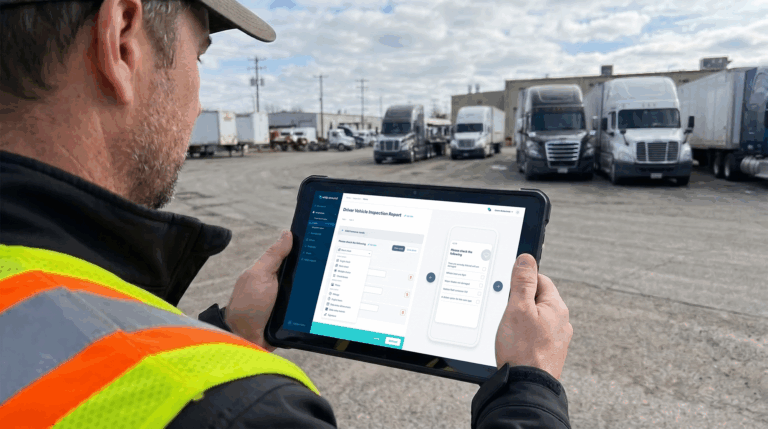
Inspections are where most maintenance problems are first spotted, so this feature deserves more weight than most buyers give it. FMCSA rules under 49 CFR 396.11 require drivers of commercial motor vehicles to report defects they find during the day’s operation, and carriers must keep those reports on file. A digital DVIR process makes reporting faster for drivers and makes compliance far easier to prove during an audit.
Look for fleet inspection software with forms you can customize by asset type, so a box truck, a trailer and a skid steer each get the right checklist. Drivers should be able to complete inspections on their phone, attach photos and submit in minutes. Managers should be able to see who completed inspections, who skipped them, and the full inspection history for any asset.
2. Defect reporting and work order management
An inspection is only useful if the defect it finds gets fixed. The most common breakdown in fleet operations happens in the handoff between “driver reported it” and “technician is working on it.” Software that depends on someone reading a report and creating a work order by hand will lose defects. Look for defect-to-work-order automation, where a failed inspection item automatically creates a work order with the driver’s notes and photos attached.
From there, strong fleet work order management lets you assign jobs, set priorities, track status and close the loop. Every defect should end one of three ways: repaired, deferred with a documented reason, or confirmed as not needing repair. If the software can’t show you every open defect by asset right now, keep looking.
3. Preventive maintenance scheduling
Missed PMs are one of the most expensive habits in fleet management, because small services skipped today turn into big repairs later. Preventive maintenance software should let you schedule service by mileage, engine hours or calendar date, whichever comes first. It should also send reminders before work is due.
Check how the software gets its meter readings. The best setups pull odometer and engine hours automatically from telematics or inspections, so nobody has to update a spreadsheet. The system should also turn due dates into a real fleet maintenance schedule your shop can plan around, with a complete service history stored for each asset.
4. Telematics and GPS integrations
This is where fleet tracking software must-haves meet maintenance. GPS and telematics devices produce useful data: location, mileage, engine hours, idle time and diagnostic trouble codes. On their own, though, those data points just sit in a dashboard. What you need is software that acts on that data, such as updating PM schedules from real mileage or creating a work order when a fault code fires.
Look for named telematics integrations with the providers you already use, plus an open API for everything else. Fleets that already run a telematics platform rarely need to rip it out. They need telematics and maintenance software working together, so vehicle data turns into maintenance work instead of another unread alert.
5. Compliance and document management
Compliance isn’t a separate project. It’s the paper trail your daily operations leave behind. Fleet compliance software should store inspection reports, repair records and certifications in a format you can search and export. That way you can produce them quickly for a DOT audit, an insurance claim or a customer contract review.
Document storage matters just as much. Look for fleet document management that keeps registrations, insurance cards, permits and inspection certificates attached to each asset, with alerts before anything expires. Drivers should be able to pull up documents on their phone during a roadside inspection instead of digging through the glove box.
6. Parts, labor, and shop management
For fleets with an in-house shop, the maintenance workflow doesn’t end with a work order. Technicians need the right parts on hand, managers need to know where labor hours go, and larger repairs need an approval process. Shop management software should track parts inventory with reorder points and log technician time against each job. It should also send expensive repairs for approval based on cost or repair type.
With rising fleet parts costs, this visibility pays for itself. When parts and labor are tied to specific work orders and assets, you get a true cost per repair. That makes it much easier to decide when an older asset is worth fixing and when it’s time to replace it.
7. Fuel management
Fuel is one of the largest line items in any fleet budget, and one of the easiest to lose track of. Fuel management software should capture fill-ups and integrate with fuel cards. It should also break down fuel cost and efficiency by asset, driver and location so you can spot outliers quickly.
The real value comes from combining fuel data with everything else. Poor fuel economy on one truck is often a maintenance problem, such as underinflated tires or a clogged air filter, rather than a driver problem. Look for software that puts connected fuel, driver, and maintenance data side by side so you can find the real cause.
8. Reporting and dashboards
You can’t manage what you can’t see. Fleet reporting software should give you dashboards for the metrics that drive decisions: cost per mile or engine hour, PM compliance, open defects, inspection completion rates, downtime, and maintenance spend by asset.
Pay attention to how reports reach people. Scheduled reports that land in a manager’s inbox every Monday get read. Reports that require logging in and building a filter usually don’t. The right software makes your most important fleet management KPIs visible without anyone exporting data into a spreadsheet first.
9. AI-assisted inspections and maintenance
AI shows up in almost every fleet software pitch, so focus on uses that save time you can measure. The most practical ones today are:
- reviewing inspection photos for defects
- flagging inconsistencies in inspection history
- helping sort reported issues by severity
Look for AI fleet maintenance software that works inside your existing inspection and maintenance workflow, not as a separate tool.
Ask vendors to show you exactly what the AI does and what a person still reviews. Understanding what AI actually catches in inspections will help you separate useful automation from marketing. Good AI makes a reliable process faster. It can’t fix a process that doesn’t exist.
Fleet tracking software must-haves: what GPS alone doesn’t cover
GPS tracking is a must-have input, but it isn’t a complete fleet management system. A tracking platform can tell you a truck is parked at the yard with 142,000 miles on it. It can’t tell you that the driver reported a cracked mirror this morning, that last week’s brake job is still waiting on parts, or that the registration expires in nine days.
That’s why the most important tracking must-have is what happens to the data. Location, mileage, engine hours and fault codes should flow into inspections, PM schedules and work orders automatically. When you evaluate tracking software, ask whether it connects to a maintenance and compliance platform, or whether someone will have to re-enter the same numbers by hand. Fleets get the most from tracking when a fault code on Monday becomes a scheduled repair by Tuesday, without anyone copying data between two systems.
What to look for in fleet management software beyond the feature list
Two products can check every box on a feature list and still deliver very different results. Ease of use matters most for the people with the least time: drivers and technicians. If the mobile app takes 15 minutes to complete an inspection, drivers will rush it or skip it. Also check that the software handles every asset you own, not just road vehicles. Good fleet asset management covers trailers, heavy equipment, generators and tools in the same system.
Then look at the pricing model and the rollout. Per-user pricing can quietly discourage you from giving every driver and technician access, which defeats the purpose. Ask how onboarding works, who supports you after launch, and how long a typical rollout takes. Many software projects fail because people don’t adopt them, not because features are missing. It’s worth reading up on the mistakes fleets make when implementing new maintenance software.
Questions to ask fleet software vendors
A demo shows you the software at its best. These questions show you how it will work on a normal Tuesday in your operation:
- How does a failed inspection item become a work order, and how long does that take?
- Which telematics providers do you integrate with, and what data syncs automatically?
- Can we schedule PMs by mileage, engine hours, and date on the same asset?
- How do we produce inspection and repair records for a DOT audit?
- Does the software support non-vehicle assets like trailers, equipment, and generators?
- How is pricing structured, and does it change as we add users or assets?
- What does onboarding look like, and who supports us after go-live?
How Whip Around covers the fleet management software checklist
Whip Around is built around the handoffs that break down most often: from the driver’s inspection to the shop’s work order to the office’s records. Drivers and operators complete customizable digital inspections on their phones. Failed items automatically create work orders with photos attached, and PMs run on mileage, engine hours or calendar dates. Whip Around integrates with telematics providers like Geotab, Samsara and Motive, so fault codes, engine hours and mileage feed directly into maintenance workflows.
The same platform stores compliance records and asset documents, tracks parts, labor and fuel, and sends scheduled reports on cost, defects and downtime. AI Inspections Pro reviews inspection photos and history to flag issues a busy reviewer might miss.
Choose software that connects the whole workflow
The best fleet management software isn’t the one with the longest feature list. It’s the one that connects inspections, maintenance, compliance and fleet data so nothing gets lost between the driver, the shop and the office. Use the nine-point checklist above to compare vendors, and push every demo past the dashboard to see how the work actually gets done.
To see how Whip Around handles every item on this checklist, book a demo or start a free trial.
FAQs about fleet management software features
What are the most important features of fleet management software?
The most important features are digital inspections, defect-to-work-order automation, preventive maintenance scheduling, telematics integrations, compliance and document management, parts and shop management, fuel management, reporting, and practical AI. Together, they keep assets safe, compliant and on the road.
What is the difference between fleet tracking software and fleet management software?
Fleet tracking software uses GPS and telematics to show where vehicles are and how they’re driven. Fleet management software covers the work that keeps those vehicles running, including inspections, maintenance, compliance records, fuel and reporting. Many fleets use both and connect them through integrations.
What should small fleets look for in fleet management software?
Small fleets should prioritize an easy mobile app for drivers, digital inspections, simple PM scheduling, and automatic work orders from defects. Pricing that includes unlimited users lets small teams give everyone access without costs climbing as they grow.
Does fleet management software help with DOT compliance?
Yes. Digital DVIRs, maintenance records and document storage make it much easier to meet FMCSA inspection and recordkeeping requirements. They also let you produce records quickly during a DOT audit or roadside inspection.
How much does fleet management software cost?
Costs vary by vendor and pricing model. Some vendors charge per vehicle, some per user, and some offer fixed pricing with unlimited users. Ask vendors how pricing changes as you add assets and people, and include onboarding and integration costs before you compare quotes.