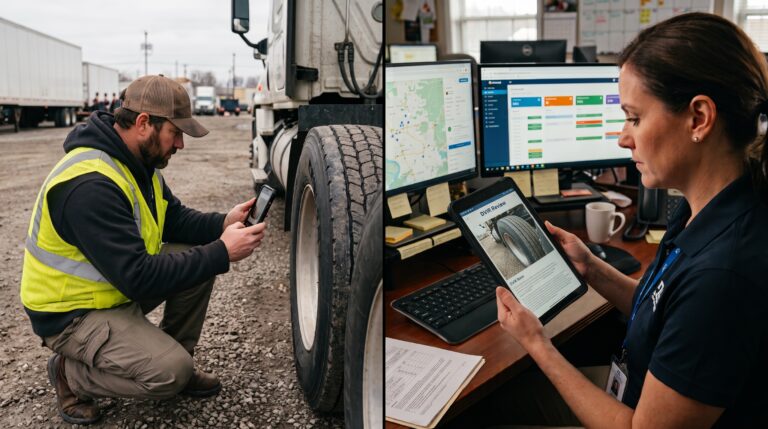
Your drivers may complete hundreds of inspections each week. The harder question is what happens to all the photos, notes, and defect reports afterward. Can your team spot an issue a driver didn’t mention? Can it tell which submissions need attention? And when someone finds a problem, does it reach the person who can fix it?
AI inspection software can help answer those questions, but the label “AI” tells you little about how a product will work in your fleet. This guide explains what to look for, what to ask a vendor, and how to test the software using your own trucking workflows.
Quick answer: Choose AI inspection software that works with your drivers’ DVIR process, reviews the photos and checks that matter to your fleet, gives a person clear evidence to evaluate, and connects confirmed defects to maintenance. Test it with real inspections before deciding whether it saves review time and improves follow-up.
First, define what you need the AI to do
“AI inspections” can describe several different capabilities. Some tools analyze photos for visible damage. Others check whether a form is complete, compare comments with images, or automate what happens after a defect is recorded. Ask vendors to demonstrate each capability separately.
Photo review is an added check on the inspection evidence. It does not perform the driver’s physical walk-around or decide whether a truck can return to service. For a closer look at that distinction, see AI vs. manual fleet inspections.
Start your search with one or two problems your team can measure. Maybe too many photos go unreviewed, defect reports vary between terminals, or a confirmed finding waits too long for maintenance. A defined problem gives you a better buying test than a long feature list.
1. Can drivers complete a usable DVIR without extra friction?
The AI can only review evidence your drivers capture. Look at the mobile inspection experience before the AI demo. Can drivers identify the right truck and trailer, follow the relevant form, add notes, and take clear photos in the time available? Ask what happens when connectivity is poor and when an inspection syncs later.
Check whether you can tailor forms and required photo checks to tractors, trailers, and other equipment. A tire or coupling photo needs enough detail to be useful; a blurry image taken from across the yard will limit any reviewer, human or AI. Whip Around’s fleet inspection software provides digital pre-trip and post-trip workflows with customizable forms and photo evidence.
Ask the vendor: Show us an entire inspection from a driver’s phone, including a poor-signal scenario and a photo that needs to be retaken.
2. What exactly does the AI review—and where do the results appear?
Ask which inspection photos the product analyzes and whether your team can choose the checks. The most useful review may be different for a tractor, a refrigerated trailer, and a service truck. Then ask for examples of the kinds of visible issues it can flag, along with examples it cannot detect reliably.
See the reviewer’s screen, not just a polished detection image. A recommendation should make it easy to view the original photo, the driver’s answer and notes, and the relevant inspection record together. The team should be able to confirm a concern or dismiss it without hunting through another dashboard.
Whip Around’s AI Inspections Pro lets admins select the photo checks to review, looks for visible damage, checks required inspection steps, and flags possible mismatches between comments and photos. Recommendations appear with the inspection for a person to assess. Read more about how AI reviews DVIR photos.
Ask the vendor: Show us a clean inspection, a valid concern, and a false alarm. What does the reviewer see and do in each case?
3. Can you trace a finding from inspection to resolution?
An AI flag alone doesn’t fix a truck. Evaluate how a confirmed finding becomes a defect, who receives it, and how your team documents the repair and sign-off. The inspection photo and notes should remain easy to find from the maintenance record.
Also look at the handoff between safety, dispatch, and the shop. FleetAI’s configurable workflow automation can respond to defined fleet events: for example, a failed inspection can trigger an out-of-service status and assign a defect. The fleet sets the rule and retains an activity log. An AI photo recommendation itself still needs human review before a manager decides whether to create a defect.
For fleets that manage repairs in-house, ask how the workflow extends into scheduling and labor. Whip Around’s separate Shop Ops capabilities support work-order scheduling, technician time, approvals, and quotes and invoices. That matters if you want to evaluate the complete inspection-to-repair process, while keeping the AI inspection purchase decision clear.
Ask the vendor: Walk us from a driver-submitted photo to a reviewed recommendation, a confirmed defect, an assigned repair, and the final record.
4. Does the system support your DVIR and recordkeeping process?
Ask how the platform handles required fields, signatures, defect history, repair certification, and access to past records. A system can flag an incomplete step, but it cannot make an incomplete inspection compliant by labeling it “AI reviewed.” Your team remains responsible for applying the rules that fit its operation.
Under 49 CFR § 396.11, applicable driver reports, carrier corrective action, and record retention have specific requirements and exceptions. Review your process against the current rule and your fleet’s equipment and operations. During a demo, ask the vendor to retrieve a past defect report and show the related repair record and certifications.
Ask the vendor: What can we produce for a specific vehicle and date if an auditor asks how a reported defect was handled?
5. Will it fit your existing fleet systems and workload?
Your team may already use telematics, maintenance tools, or outside repair shops. Ask which data moves between systems, which actions remain manual, and who owns an exception when a connection fails. A useful inspection workflow should give reviewers enough asset context to act without duplicating the same defect in several places.
Look beyond inspections if your team spends time re-entering repair documents. FleetAI can extract asset details, line items, and costs from vendor invoices and receipts to help create maintenance and expense records. This is a separate capability from photo review, so ask to see it with your own documents if it affects the business case.
Ask the vendor: Which of our current tools connect to this workflow, and what would our team still need to enter or review?
Run a pilot that reflects your fleet
A staged demo can make every product look accurate. A small pilot with your own inspections tells you more. Include different vehicle types, terminals, lighting conditions, drivers, and both clean and defective inspections. Have the same people who would use the system review the results.
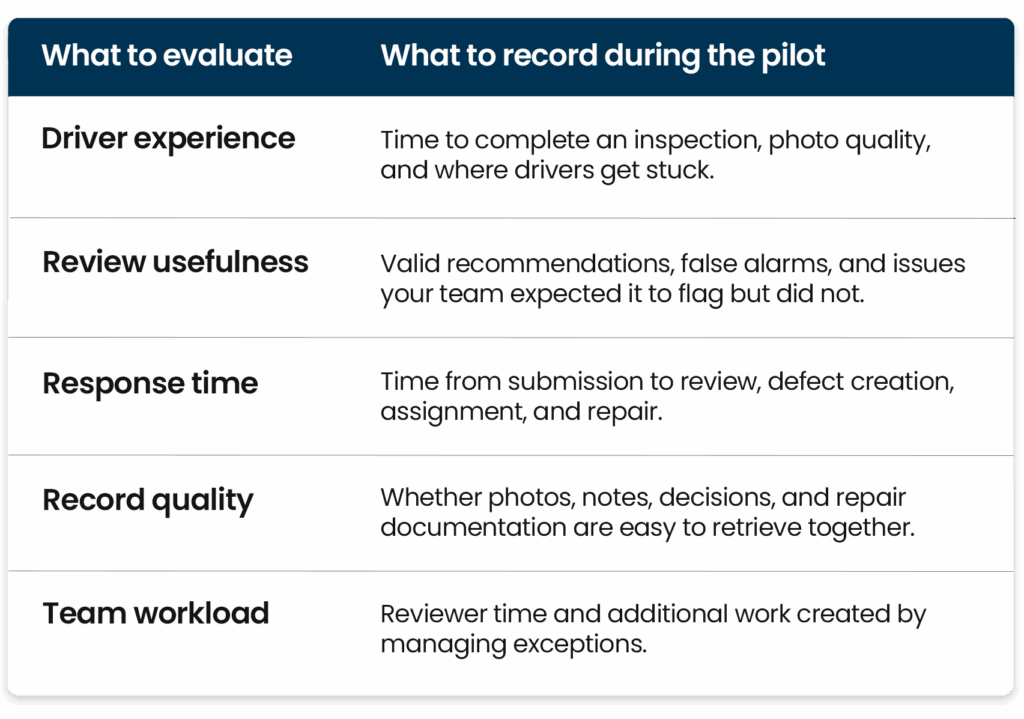
Agree on a few success measures before the pilot starts. The right software should help your team review evidence and close the loop on confirmed issues, not simply generate more alerts.
How to make the final decision
Choose the platform that your drivers can use consistently and your reviewers can trust in day-to-day work. Confirm what is included in the quoted plan, what requires an add-on, how your team will be trained, and how the product handles corrections and edge cases. Ask to see the full workflow using a tractor and trailer from your operation before signing off.
Whip Around combines digital DVIRs with AI Inspections Pro for selected photo and submission review. FleetAI can extend the process with configurable workflows and document scanning, while Shop Ops offers additional tools for managing work in the shop. Book a demo to test the steps that matter most to your trucking fleet.
Frequently asked questions about AI inspection software
What is AI inspection software for a trucking fleet?
It is software that uses AI to review evidence captured during vehicle inspections, such as photos and submitted details, and surface possible defects or gaps for a person to evaluate. The driver still performs the physical inspection.
Does AI inspection software replace a DVIR?
No. AI can assist with reviewing a digital DVIR, but it does not replace the driver’s inspection, required reporting, repair decisions, or applicable recordkeeping steps.
What should I test in an AI inspection software demo?
Test the driver’s mobile workflow, the photo checks the AI analyzes, useful and incorrect flags, the manager’s review screen, and the route from a confirmed defect to a repair record. Use examples from your own trucks and trailers where possible.
Can AI automatically take a truck out of service?
Some platforms support configurable rules for defined events, such as a failed inspection. In FleetAI, a fleet can set a rule that marks an asset out of service when that condition occurs. A photo recommendation itself is a finding for human review, not an automatic roadworthiness decision.
Do I need shop software to use AI inspection review?
No. AI inspection review addresses inspection evidence and recommendations. Shop tools become relevant if you also need scheduling, technician labor tracking, approvals, or billing after a repair is assigned.
Featured image idea: A fleet manager and technician reviewing a truck’s inspection photo on a tablet at a service bay, with the truck visible behind them. The screen shows a subtle review flag and the original image, rather than an automated “pass” or “fail” verdict.
Suggested alt text: Fleet manager and technician review a flagged truck inspection photo on a tablet.