A driver submits a DVIR with photos from a pre-trip or post-trip inspection. Someone at the fleet still has to make sense of it: Was every required check completed? Does a photo show damage the driver did not report? Does a finding need a repair before that truck goes back out?
For a trucking operation receiving inspections from many drivers, vehicles, and terminals, reviewing every photo by hand becomes a substantial task. AI fleet inspection software can help screen that evidence and point reviewers toward possible issues. The difference is how submitted inspections are reviewed, not who performs the physical walk-around.
Quick answer: Manual DVIR review relies on a person to open reports, check photos and notes, and decide what needs follow-up. AI-assisted review analyzes selected inspection photos and checks for incomplete steps or mismatches, then surfaces recommendations for a person to evaluate. In both cases, drivers perform the inspection and people decide what action to take.
What does manual DVIR review involve?
In a manual review process, a fleet manager, safety team member, or maintenance coordinator looks through the driver’s report and supporting images. They may confirm that the right vehicle was inspected, read notes on reported defects, check photos for visible concerns, and route an issue to maintenance.
Human review brings judgment and context. A reviewer can ask a driver for clarification, compare a finding with repair history, or decide which shop should handle it. The difficulty is coverage. A reviewer working through a large queue may have time to focus on reported defects while clean-looking submissions and their photos receive less attention.
The underlying digital fleet inspection workflow also matters. If photos, driver comments, and repair records live in separate places, even a careful reviewer has more work to reconstruct what happened.
What does AI-assisted DVIR review do differently?
AI fleet maintenance software examines evidence captured during the driver’s inspection. With Whip Around’s AI Inspections Pro, admins choose which photo checks to analyze. The system can look for visible damage in those images, check whether required inspection steps were completed, and flag potential conflicts between photos and driver notes.
A recommendation appears with the inspection record for a manager to review. If the issue needs action, the manager can create a tracked defect from that recommendation—or dismiss recommendations that do not require follow-up, including multiple recommendations at once. AI does not determine whether a truck is roadworthy on its own.
For a closer look at the image-analysis workflow, read how AI reviews DVIR inspection photos.
AI fleet inspections vs. manual DVIR review: A practical comparison
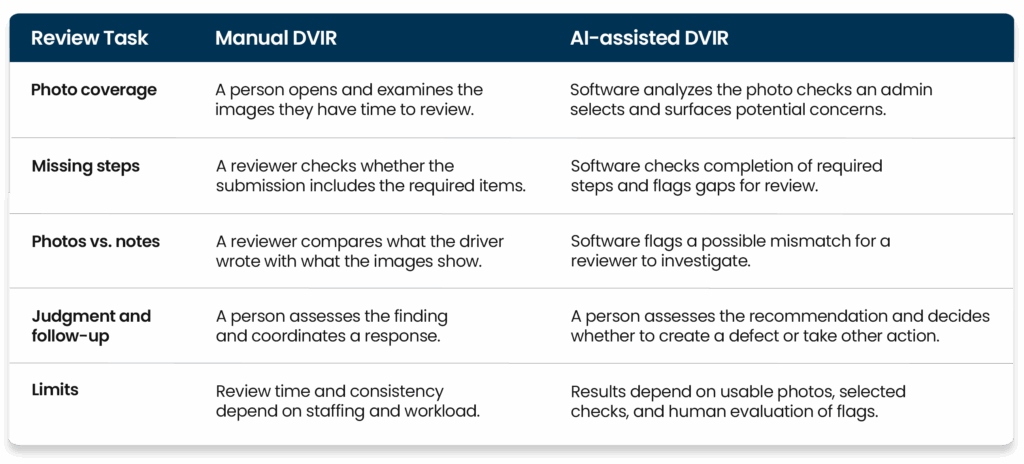
The strongest process uses both: software helps sort a growing volume of evidence, while your team applies the judgment needed to resolve what it finds.
Where the difference matters most for trucking fleets
Finding a photo-and-report mismatch
Imagine a driver marks an exterior check as having no issues, but the attached photo appears to show damage near a trailer coupling point. A manual reviewer can catch the discrepancy if they open and study that image. AI-assisted review can flag the mismatch so the team knows which inspection to examine. A manager or mechanic then verifies the concern and decides what happens next.
Giving every terminal a consistent review process
When several locations submit inspections, the number of images can grow quickly. AI can apply the same selected photo checks across those submissions and direct attention to possible exceptions. Managers still need clear rules for handling recommendations, including who reviews them and how quickly a suspected safety issue is escalated.
Connecting a finding to a repair record
An inspection flag is only useful if someone follows it through. Keeping the photo, the recommendation, the resulting defect, and any repair work connected makes it easier to see how an issue was handled. Learn more about the next step in Whip Around’s fleet maintenance workflow.
What happens after AI flags a possible issue?
Review is the first step. Once a manager verifies a recommendation and creates a defect, the team needs a clear path to address it. Whip Around’s FleetAI and Shop Ops features can extend that path in different ways:
- Confirm the finding. A manager reviews the inspection photo and driver notes, then creates a defect if the issue warrants action. An AI recommendation alone is not a repair authorization.
- Route the next step. FleetAI workflow automation can apply rules to defined fleet events. For example, a failed inspection can trigger an out-of-service status and assign a defect to the appropriate person. These rules are configured by the fleet, and the automation activity is logged.
- Plan and complete the repair. Shop Ops adds shop scheduling, technician labor tracking, approvals, and quotes and invoices to the work-order process. The shop can manage the repair while retaining its connection to the inspection finding.
FleetAI’s document scanning can also extract asset details, line items, and costs from related vendor invoices and receipts, reducing manual entry when the team records maintenance expenses. These features support the workflow after review; they do not change who performs the DVIR or who evaluates a safety concern.
What AI review cannot do
Photo analysis can only assess what is visible in the images it reviews. It cannot feel brake response, hear an unusual noise, smell a fluid leak, or examine an area the driver did not photograph clearly. It can also surface a concern that a person determines needs no action.
That distinction matters for compliance. Federal DVIR requirements address driver reporting and carrier action on reported safety-related defects. An AI recommendation is a review aid; it does not complete the driver’s inspection, certify a repair, or make a return-to-service decision. Requirements also vary with the operation and equipment, so fleets should evaluate their own procedures against the applicable rules.
If you’re comparing AI with the driver’s hands-on walk-around rather than the office review of a submitted report, see our guide to AI vs. manual fleet inspections.
How to make AI-assisted DVIR review useful
Start with the photo checks that matter most to your operation, such as tires, lights, or coupling areas. Make sure drivers know what a usable photo looks like. Assign someone to review flagged inspections, and define how a confirmed issue becomes a defect and reaches maintenance.
Then watch the process, not just the number of flags. Are recommendations being reviewed promptly? Are confirmed issues being documented and resolved? Are poor-quality photos making the results less useful? Those answers tell you whether AI is improving the review process for your fleet.
Whip Around’s AI Inspections Pro adds photo and submission review to the inspections your drivers already complete. FleetAI can help route confirmed issues and capture related documents, while Shop Ops helps the shop plan, track, and bill the work. See how your team can move from a flagged DVIR to a documented repair.
Frequently asked questions
Does AI replace a driver’s pre-trip or post-trip inspection?
No. The driver still checks the vehicle and completes the inspection. AI-assisted DVIR review evaluates selected photos and submission details captured during that process; it cannot perform physical or sensory checks.
Does AI replace a fleet manager’s DVIR review?
No. AI surfaces possible damage, incomplete steps, or inconsistencies for a manager to evaluate. A person decides whether a recommendation requires a defect record, repair, or other follow-up.
Can FleetAI automatically take a truck out of service?
FleetAI lets a fleet configure workflow rules that mark an asset out of service when a defined condition, such as a failed inspection, occurs. An AI photo recommendation by itself does not automatically make that decision; the fleet sets the triggering rule and remains responsible for its safety process.
How does Shop Ops fit into the DVIR process?
Shop Ops supports the repair work that may follow a confirmed inspection finding. It adds scheduling, technician labor tracking, approvals, and billing tools to Whip Around’s work orders. The driver still conducts the inspection, and the fleet team still reviews any AI recommendation.
Can AI review a DVIR with no photos?
Photo-based analysis needs images of the relevant inspection checks. Other submitted information may still be part of an inspection workflow, but AI cannot identify a visible defect in a photo that was never captured.
Is an AI-reviewed DVIR automatically compliant?
No. AI review can help a team identify gaps, but compliance depends on completing the applicable inspection, reporting, repair, certification, and recordkeeping steps. An AI flag or an apparently clean image is not a compliance determination.
Featured image idea: A real truck and trailer in a yard, with a driver photographing a component during an inspection. A subtle inset shows the same photo in a manager’s review view with one item flagged for closer inspection. Avoid showing AI independently approving a vehicle.
Suggested image alt text: Driver photographing a truck during a DVIR while a fleet manager reviews a flagged inspection photo.