Running a 30-truck landscaping operation is a different challenge than running five. The work is the same (routes, crews, equipment), but the data problem is exponentially harder. At five trucks, a fleet manager can keep most of it in their head. At thirty, the GPS is in one app, the maintenance log is in a spreadsheet, crew scheduling is on a whiteboard or a separate platform, and no single person can see all three at once.
That fragmentation has a real cost: breakdowns that weren’t caught because maintenance data was stale, routes that weren’t verified because GPS wasn’t connected to the crew schedule, inspection flags that sat in a paper form instead of triggering a work order. For enterprise landscaping operations, fixing the data problem isn’t a technology project. It’s an operational necessity.
This article explains how enterprise landscaping firms are integrating GPS, maintenance, and crew operations data into a connected view, what each data stream contributes, and what changes operationally when they work together.
Why Landscaping Fleet Data Is Fragmented, and Why That’s a Scale Problem
The US landscaping industry reached $184 billion in 2025, and the operations capturing the largest share of commercial contract work are managing fleets that have outgrown the tools that worked at their founding size.
Most landscaping companies already collect all three types of data. GPS tracking is standard across commercial fleets. Maintenance records exist, whether in a shop log, a spreadsheet, or a basic software system. Crew scheduling lives somewhere, whether that’s a whiteboard, a shared calendar, or a field service app. The problem isn’t that the data doesn’t exist. The problem is that it’s siloed, and silos have consequences at scale.
When GPS data doesn’t connect to maintenance records, service intervals get missed because no one manually updated the mileage. When crew scheduling doesn’t connect to GPS, verifying route completion requires phone calls instead of a dashboard check. When inspection reports live on paper, a defect that an operator flagged on Tuesday doesn’t reach the shop until someone thinks to walk the form over.
Landscaping fleet management at the enterprise level requires these three data streams to talk to each other, automatically, in real time, without manual handoffs. That’s the shift this article addresses.
What Each Data Stream Tells You, and What It Misses Alone
Before examining how the data connects, it’s worth being specific about what each stream contributes in isolation versus in combination.
GPS data tells you where your vehicles and equipment are and whether they’re moving. It can tell you that truck 14 stopped for 40 minutes on a route that should take 25. It cannot tell you whether that stop was a breakdown, a scheduled property visit that ran long, an operator making an unauthorized stop, or a traffic delay. Without context from maintenance and crew data, GPS generates location information, not operational intelligence.
Maintenance data tells you what’s been serviced, when it was done, and what’s coming due. But in a disconnected workflow, it’s only as current as the last manual entry. If a driver doesn’t report the odometer reading at end of shift, the mileage-based PM trigger never fires. If the shop doesn’t log a repair until the following week, the service history is inaccurate. Maintenance data without automatic inputs from telematics degrades quickly in busy operations.
Crew operations data tells you who is scheduled, where, and for how long. It cannot verify execution (whether a crew arrived on time, completed the work, or spent longer than expected on a route) without GPS to back it up. And it has no visibility into whether the equipment assigned to that crew is in condition to do the job.
Combined, each stream fills the blind spots of the others. GPS context turns maintenance data into predictive alerts. Crew schedules paired with GPS become verified execution records. Inspection data linked to operators creates accountability loops that no single data stream can establish alone.
How Enterprise Landscaping Firms Actually Integrate GPS, Maintenance, and Crew Data
The integration is a set of specific workflow connections that eliminate the manual handoffs where information gets lost. Here’s how each integration point works in practice.
1. Telematics Feeds Maintenance Schedules Automatically
The most impactful single integration for landscaping fleet management is telematics data flowing directly into maintenance scheduling. When a GPS telematics provider connects to fleet maintenance software, engine hours and mileage update automatically, without anyone manually logging odometer readings or runtime.
PM triggers fire on actual usage data. A mower trailer that runs three additional hours one week gets its next service due date adjusted accordingly, not on a fixed calendar estimate that assumes uniform usage. Fault codes from the vehicle’s OBD system can generate maintenance alerts or work orders in real time, before the operator knows to report anything.
Whip Around integrates directly with Geotab, Samsara, and Motive, the telematics platforms most common in commercial landscaping fleets. When those integrations are active, the usage data that drives landscaping equipment management software maintenance workflows updates itself. Missed service intervals because someone forgot to log mileage stop being a routine problem.
2. GPS Location Data Validates Crew Schedules and Route Completion
Crew scheduling tells you who should be where. GPS tells you who actually arrived, when they got there, and how long they stayed. When these connect, operations managers can verify that commercial accounts were serviced as scheduled without calling a crew lead for confirmation.
That’s not micromanagement. It’s managing by exception. A fleet manager overseeing 15 crews across 200 properties in a day can’t personally verify every stop. But a dashboard that flags the three properties where crews didn’t arrive within the scheduled window, or the two routes where dwell times were significantly shorter than expected, lets them focus attention where it’s actually needed.
For enterprise operations with commercial contracts that carry service level commitments, GPS-backed route verification is also documentation: evidence that work was completed on time and on site.
3. Inspection Data Connects Equipment Condition to Crew Accountability
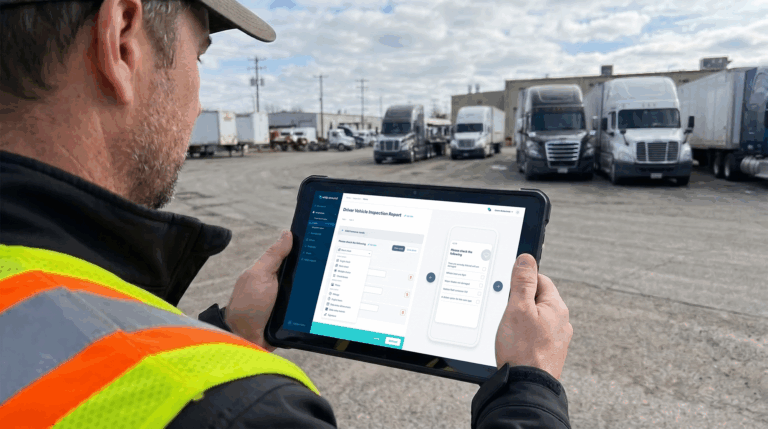
When operators complete digital pre-use inspections before equipment leaves the yard, the record is timestamped, attributed to a specific operator, and tied to a specific asset. That combination (who inspected what, when, and what they found) creates an accountability layer that paper inspections can’t provide.
Patterns that paper inspection never surfaces become visible in digital records: a specific trailer that accumulates damage at the same route, an operator who consistently flags issues that other operators on the same equipment don’t, equipment that leaves the yard in sound condition and returns with new damage unreported. The data connects operator behavior to equipment condition in a way that supports both accountability conversations and maintenance planning.
Building comprehensive checklists for your landscaping fleet by equipment type, by season, and by crew role gives the inspection workflow the structure it needs to generate useful data, not just a logged checkbox.
4. Defect Reports Auto-Generate Work Orders Without Manual Handoff
In a disconnected workflow, the path from a driver’s observation to a shop work order has multiple failure points. The driver mentions the issue to a supervisor. The supervisor means to tell the shop. The shop finds out two days later, after the equipment has been deployed again.
In an integrated workflow, the driver flags the defect in a digital inspection form: a brake light out, a hydraulic line soft to the touch, a trailer hitch showing unusual wear. A maintenance work order is automatically created and assigned. The shop sees it within minutes. The equipment gets flagged before the next dispatch cycle.
That automation removes three manual steps from the process, and more importantly, removes the assumption that information will be passed along correctly under daily operational pressure. It usually isn’t.
5. A Unified Dashboard Replaces the Morning Phone Call Loop
In fragmented operations, the start-of-day information gathering (where is every crew, what equipment is down, what was flagged yesterday) requires a series of calls, texts, and check-ins that can consume the first hour of a fleet manager’s day before any actual managing happens.
A unified landscaping fleet management view surfaces all of that without the calls: GPS status for every vehicle, open work orders from yesterday’s inspection flags, scheduled PMs coming due this week, and crew assignments for the day, all visible in one place before the first truck leaves the yard.
For a fleet manager responsible for 40 vehicles and 20 crews, that hour of information gathering compresses to a five-minute dashboard review. The decisions that used to wait for information can now happen in time to actually affect the day’s operations.
6. Compliance Data Travels With the Vehicle, Not the Office
Commercial vehicles in landscaping fleets (box trucks, tow vehicles, and trailers over certain weight thresholds) are subject to DOT and FMCSA requirements. Driver Vehicle Inspection Reports (DVIRs) must be completed and retained. The FMCSA no-defect DVIR rule specifies exactly what’s required, and non-compliance during a DOT safety audit creates liability that paper-based record-keeping struggles to defend against.
When DVIR records and compliance documentation live in the same platform as GPS and maintenance data, a manager can confirm any vehicle’s compliance status from a phone or laptop, without tracking down the physical paper file. During an audit or a roadside inspection, having digital records that are complete, current, and immediately accessible is a material operational advantage.
What Enterprise Landscaping Operations Gain From Integrated Data
The business case for connecting GPS, maintenance, and crew data isn’t theoretical. The operational gains are specific and measurable.
Fewer unplanned breakdowns. Maintenance stays current because usage data updates automatically. PM triggers fire on real engine hours, not manual entries that may be weeks behind. Preventive maintenance programs reduce equipment downtime by up to 45% compared to reactive approaches. Reactive maintenance costs three to nine times more than planned maintenance when it does occur.
Faster breakdown response. When equipment fails in the field, the technician dispatched to it has instant access to the full service history: what was last serviced, what was flagged in recent inspections, what fault codes have appeared. Diagnosis is faster because the context is already there.
Better crew accountability without micromanagement. GPS verifies route completion automatically. Digital inspections attribute equipment condition to specific operators. Managers can hold crews accountable to results (arrival times, route completion, equipment condition at return) without being on-site to observe it.
Less administrative overhead. Dispatchers and fleet managers spend significantly less time chasing information across disconnected systems. Work orders create themselves. PM schedules update from telematics. Crew verification happens in the dashboard. The hours previously spent on manual data consolidation redirect to actual fleet management decisions.
Audit-ready records. Inspection history, service records, DVIR documentation, and compliance data live in one searchable location, accessible during DOT audits, insurance reviews, or customer service inquiries, without a search through filing cabinets.
Smarter seasonal planning. Historical data by route, crew, and equipment type informs next year’s staffing and fleet decisions. Which routes are hardest on equipment? Which crew assignments drive the most callbacks? Which assets have maintenance costs that no longer justify keeping them? Integrated data answers these questions; siloed data can’t.
How Whip Around Fits Into a Landscaping Fleet’s Data Stack
Whip Around is not a GPS platform or a crew scheduling tool. It’s the inspection and maintenance layer that connects to those systems and fills the gaps they leave. For enterprise landscaping operations, that distinction matters.
The GPS platforms most common in commercial landscaping (Geotab, Samsara, Motive) are excellent at location tracking, driver behavior monitoring, and telematics data collection. What they don’t do is manage the inspection workflow that catches defects before they become failures, or the maintenance scheduling that responds to those defects with automated work orders. That’s what Whip Around provides, and it integrates directly with all three telematics platforms to pull in the engine hours and mileage that drive its PM scheduling.
The practical workflow looks like this: a crew lead completes a digital pre-use inspection on their truck and trailer before leaving the yard. Any flagged defects automatically generate a work order. Throughout the day, engine hours pull in from the telematics integration and update the PM schedule without anyone entering data manually. At end of day, a post-trip inspection closes the loop on equipment condition. The fleet manager’s dashboard shows the full picture: what was inspected, what was flagged, what’s in the maintenance queue, and what’s due for service this week.
Belknap Landscape uses Whip Around to maintain DOT compliance across their commercial fleet, keeping inspection records current and audit-ready as a standard part of their daily workflow, not as a scramble before a review.
For a full overview of how Whip Around supports landscaping operations, see fleet management and tracking software for landscaping and the equipment maintenance software comparison guide.
What to Look for When Evaluating Landscaping Fleet Software
If you’re evaluating platforms to bring GPS, maintenance, and crew data together, these are the questions that separate tools that actually integrate from those that just claim to:
Does it connect to your existing telematics provider? Replacing a GPS platform is a significant disruption. Look for software that integrates with what you already have. Geotab, Samsara, and Motive cover most commercial landscaping fleets.
Does it handle both commercial vehicles and off-road equipment? Trucks and trailers have FMCSA compliance requirements; mowers and implements don’t. A platform that only handles one category leaves gaps.
Can inspection forms be customized by equipment type? A pre-use check for a dump trailer is different from one for a ride-on mower. The ability to build equipment-specific forms is essential for useful inspection data.
Does maintenance scheduling trigger on engine hours, not just calendar dates? Calendar-based scheduling assumes consistent usage. Engine-hour triggers respond to actual wear, which is what matters.
Is there a field-ready mobile app? Operators aren’t doing inspections at a desktop. If the mobile experience requires significant training or has a poor UI, inspection completion rates drop.
What does pricing look like at your crew size? Per-seat pricing can become a significant expense in large landscaping operations with seasonal labor. Whip Around’s fixed, unlimited-user pricing model means adding seasonal crew members doesn’t add per-seat cost, which is a meaningful difference for operations that scale headcount significantly in peak season.
Bring Your Fleet Data Together Before Peak Season
Enterprise landscaping operations already have the data: GPS locations, maintenance records, and crew schedules. The gap isn’t collection; it’s connection. When those three streams run separately, each one generates information that doesn’t quite tell the full story. When they connect, the operational picture becomes clear enough to actually manage from.
The firms scaling commercial landscaping contracts are the ones that can dispatch crews confidently, catch equipment problems before they cause route failures, and verify service completion without manual confirmation loops. That capability comes from integrated data, not more data in more disconnected systems.
Whip Around provides the inspection and maintenance layer that ties your telematics data to your fleet’s actual condition and keeps your commercial vehicles DOT-compliant alongside every other asset in the yard. See how it works for landscaping fleets, or book a demo to walk through the integration with your existing GPS setup.