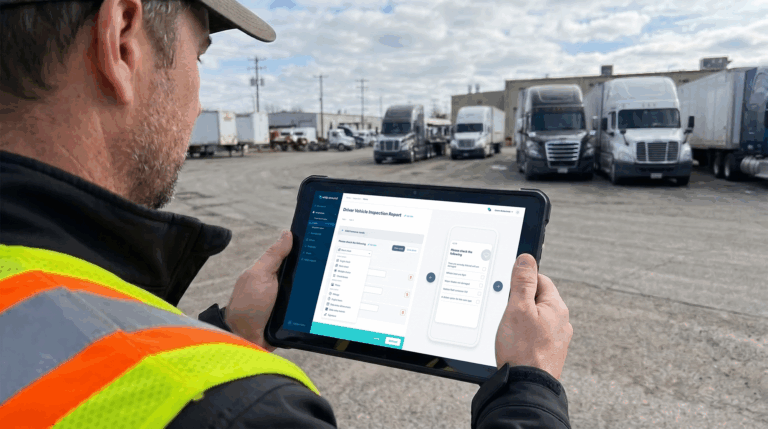
Every commercial motor vehicle driver operating a vehicle over 10,001 lbs GVWR is required by federal law to complete a Driver Vehicle Inspection Report before and after every trip. It is one of the most fundamental compliance requirements in commercial fleet operations, and one of the most commonly mismanaged.
Skipped DVIRs, incomplete reports, and defects that never make it to the maintenance queue are among the top causes of DOT violations, out-of-service orders, and avoidable breakdowns. This guide covers everything fleet managers and drivers need to know about DVIR meaning, the inspection process, what a compliant report includes, how paper and electronic DVIRs compare, and how digital workflows make DVIR compliance easier to maintain across a full fleet. For a detailed inspection checklist, see the DVIR checklist.
What does DVIR mean?
DVIR stands for Driver Vehicle Inspection Report. It is a federally mandated record that commercial motor vehicle drivers complete to document the condition of their vehicle at the start and end of each operating day. The report confirms that the driver has physically inspected the vehicle, notes any defects or deficiencies identified, and verifies that the vehicle is safe to operate.
The DVIR requirement is established under 49 CFR Part 396, administered by the Federal Motor Carrier Safety Administration (FMCSA). It applies to all commercial motor vehicles with a gross vehicle weight rating over 10,001 lbs operating in interstate commerce, as well as vehicles transporting hazardous materials or designed to carry passengers. The regulation requires that inspections be completed at least twice per operating day: once before the first trip and once after the last trip.
An electronic DVIR, or eDVIR, is the digital version of the same report. It carries the same legal weight as a paper DVIR and must meet the same FMCSA content requirements, but it is completed through a mobile app or software platform rather than on paper.
What is a DVIR report?
A DVIR report is the actual document produced by the inspection. It records what the driver checked, what condition those items were in, and whether any defects were found. Under FMCSA rules, the report must include the vehicle identification (unit number, license plate, or VIN), the date and time of inspection, the specific parts and accessories inspected, a notation of any defects or deficiencies, and the driver’s signature certifying the report is accurate.
If no defects are found, the driver certifies that the vehicle is in satisfactory condition and no repairs are needed before the next trip. If defects are found, the report triggers a repair and certification workflow: the carrier or mechanic must either make repairs or certify in writing that the defects do not affect safe operation, and the next driver must review the previous DVIR and sign acknowledgment before operating the vehicle.
DVIR reports must be retained for a minimum of three months from the date they were submitted. They must be kept at the carrier’s principal place of business and be available for inspection by FMCSA or DOT officials. For fleets using fleet compliance software with DVIR capabilities, digital records satisfy this requirement as long as they are accessible and meet the content standards.
The DVIR process: from inspection to repair sign-off
A compliant DVIR workflow has five distinct steps. Each one matters, and a breakdown at any point creates a compliance gap.
Step 1: Complete the pre-trip inspection
Before operating the vehicle, the driver conducts a physical walkaround inspection covering all required parts and accessories. This includes checking brakes, tires, lights, steering, coupling devices, emergency equipment, and any other components specified in the carrier’s inspection form. The inspection should be thorough enough that the driver can certify the vehicle is safe to operate for the trip ahead.
The pre-trip inspection is not a formality. FMCSA estimates that DVIRs help prevent approximately 14,000 accidents annually by catching defects before they cause failures on the road. Drivers who rush through or skip the inspection are not just creating a compliance gap, they are missing the point of the regulation.
Step 2: Complete the post-trip inspection
At the end of the operating day or after the last trip, the driver completes a second inspection of the same vehicle. The post-trip inspection catches any defects that developed during the day, including issues the driver noticed while operating but did not have the opportunity to document, and items that were in acceptable condition at departure but have since worn or failed.
The post-trip report is what the next driver reviews before taking the vehicle out. If the post-trip DVIR notes a defect, the next driver cannot operate the vehicle until a certified repair or a written statement that the defect does not affect safe operation has been recorded.
Step 3: Report defects clearly
When defects are found, they must be documented specifically. A report that says “tire issue” is not sufficient. The DVIR should note which tire, what the condition is, and whether the defect affects safe operation. Photo documentation, available in digital DVIR platforms, provides additional clarity and creates an auditable record that supports both compliance and repair workflow.
Drivers should be trained to report what they actually observe, not what they think the mechanic wants to hear. Underreporting defects to avoid delays is a common problem that creates both safety risk and compliance exposure when the vehicle is later inspected at a roadside check.
Step 4: Repair safety-related defects
Any defect that affects the safe operation of the vehicle must be repaired before the vehicle returns to service. The mechanic or carrier representative who performs the repair must certify in writing that the repairs were made and that the vehicle is safe to operate. This certification becomes part of the DVIR record.
Not every defect requires immediate repair before the next trip. Defects that do not affect safe operation, such as a minor cosmetic issue or a non-critical accessory failure, can be noted without requiring the vehicle to be held. However, the determination that a defect does not affect safe operation must be documented by the carrier, not simply ignored.
Step 5: Review and sign off before the next trip
The incoming driver must review the most recent DVIR before operating the vehicle. If the previous report noted defects, the driver must confirm that repairs were made or that a written determination of safe operation has been recorded. The driver then signs the report acknowledging that review. This sign-off closes the compliance loop and documents that the driver operated the vehicle with awareness of its current condition. For DOT compliance and electronic DVIR software for trucking operations, this step is where digital platforms add the most value: the previous DVIR is immediately visible to the next driver in the app, eliminating the risk of a paper report being lost or overlooked in a cab.
DVIR compliance requirements fleets need to know
The core DVIR compliance requirements under 49 CFR Part 396 are straightforward. The complexity comes from applying them consistently across a full fleet, multiple drivers, and daily operations.
- Inspections required: Pre-trip and post-trip for every CMV over 10,001 lbs GVWR operating in interstate commerce, vehicles transporting placarded hazmat, and vehicles designed to carry 9 or more passengers.
- Frequency: At minimum twice per day, once before the first trip and once after the last trip. Drivers who operate multiple vehicles in one day must complete a DVIR for each vehicle.
- Content: Vehicle identification, date and time, parts inspected, defects noted (or a statement that no defects were found), and driver signature.
- Defect repair certification: Safety-related defects must be repaired and certified before the vehicle returns to service. Non-safety defects must be documented with a written determination.
- Next-driver review: The incoming driver must review the previous DVIR and sign acknowledgment before operating the vehicle.
- Record retention: DVIRs must be retained for a minimum of three months from the submission date, at the carrier’s principal place of business.
- Exemptions: Drivers who operate the same vehicle every day and find no defects may be exempt from the post-trip requirement under certain conditions. Private motor carriers of passengers are also subject to modified requirements. Review 49 CFR 396.11 for the full exemption criteria.
Non-compliance carries real consequences. Driving a vehicle with uncertified defects, failing to complete a required DVIR, or failing to retain records can result in DOT fines, points against the carrier’s CSA score, and out-of-service orders that ground vehicles immediately.
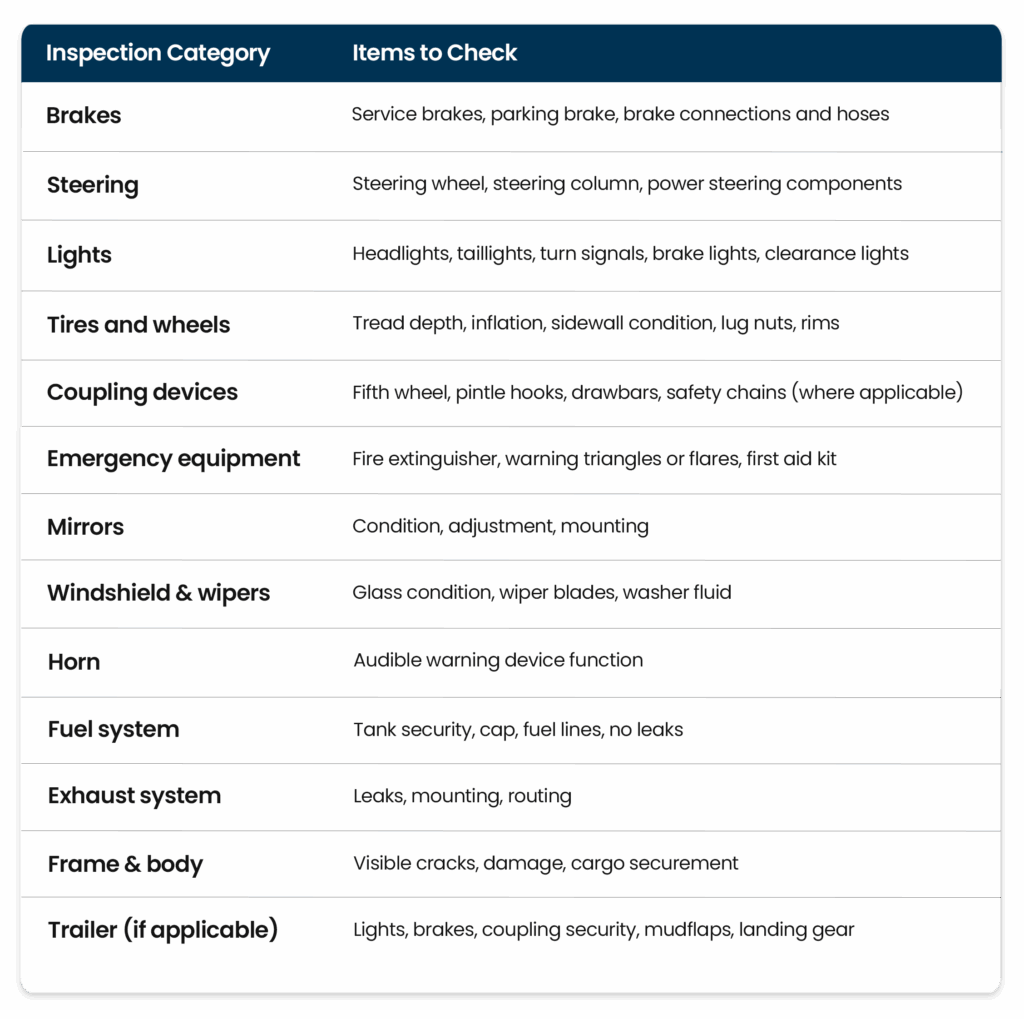
What should be included in a DVIR checklist?
FMCSA regulations specify the minimum parts and accessories that must be inspected and reported on a DVIR. The table below covers the required items. For a full breakdown of what each inspection point involves, see the detailed DVIR checklist.
Paper DVIR vs. electronic DVIR: what is the difference?
Paper DVIRs and electronic DVIRs (eDVIRs) satisfy the same federal requirement. The difference is in how reliably and efficiently each method produces a compliant, usable record.
A paper DVIR is a physical form completed by hand. It must be signed by the driver, kept on the vehicle or submitted to the carrier, and retained for three months. The practical problems with paper are well documented: forms get lost, fields get skipped, handwriting is illegible, and there is no real-time visibility into what drivers reported. By the time a fleet manager reviews a paper DVIR, the vehicle may already be back on the road with an unresolved defect.
An electronic DVIR is completed through a mobile app or software platform. The driver works through a structured digital form that requires each field to be completed before submission. Photos can be attached directly to flagged items. The report is submitted in real time, so the fleet manager sees it immediately. Defects can be automatically routed into a work order queue. Records are stored in a searchable, audit-ready format with timestamps, driver signatures, and photo documentation.
Electronic DVIRs do not require an ELD or any specific hardware. They run on a smartphone or tablet. The FMCSA accepts electronic records as long as they meet the same content requirements as paper DVIRs and are accessible for review by authorized officials.
How digital DVIR software helps fleets stay compliant
The most common DVIR compliance failure is not a misunderstanding of the regulation. It is a process failure: inspections that are skipped because the paper form is not in the cab, defects that are reported but never reach the shop, records that are lost before the three-month retention window closes. Digital DVIR software addresses each of these breakdowns.
When drivers complete inspections through a mobile app, the form is always available, the required fields are enforced, and the submitted report is immediately visible to the fleet manager. Photo documentation of defects reduces ambiguity in the repair process. Defect-to-work-order automation means that a flagged brake issue generates a work order in the maintenance queue the moment the driver submits the inspection, without anyone having to manually transfer information from a paper form. For fleets looking to move beyond paper, the next gen DVIR guide covers the full case for digital inspection workflows in detail.
Compliance dashboards give fleet managers a real-time view of inspection completion rates across the full fleet. Overdue inspections, open defects, and unsigned reports are visible before they become violations, not after a roadside check surfaces them. Digital records with timestamps and driver signatures satisfy the retention requirement and are accessible for audit review without sorting through boxes of paper forms.
Manage DVIR inspections and reports with Whip Around
Whip Around’s inspection platform is built around the DVIR workflow. Drivers complete pre-trip and post-trip inspections from the mobile app, with customizable forms for any vehicle type in the fleet. Required fields are enforced before submission. Photos attach directly to defect items. Reports are timestamped, signed, and stored in a searchable compliance record the moment the driver submits.
Defects flagged during inspections automatically generate work orders routed to the shop, closing the gap between what drivers report in the field and what mechanics act on. Fleet managers see inspection completion status, open defects, and repair progress from a single dashboard. When a DOT auditor asks for three months of DVIR records, the answer is a filtered export, not a search through paper files.
Whip Around works across every asset type in the fleet, not just DOT-regulated vehicles. The same inspection workflow that handles pre-trip and post-trip DVIRs for trucks also handles equipment inspections for trailers, heavy machinery, and non-vehicle assets. See how it works for DOT compliance and electronic DVIR software for trucking on the trucking industry page. Book a demo to see the full inspection and compliance workflow.
DVIR FAQs
What does DVIR stand for?
DVIR stands for Driver Vehicle Inspection Report. It is the federally mandated record that commercial motor vehicle drivers complete before and after each trip to document the vehicle’s condition and note any defects found during inspection.
Is a DVIR required every day?
Yes, for any day the vehicle is operated. The FMCSA requires a pre-trip inspection before the first trip and a post-trip inspection after the last trip of each operating day. Drivers who operate multiple vehicles in a single day must complete a separate DVIR for each vehicle. There is a limited exemption for drivers who operate the same CMV every day and find no defects, but the exemption has specific conditions set out in 49 CFR 396.11 and does not eliminate the inspection requirement entirely.
How long do fleets need to keep DVIR records?
FMCSA requires carriers to retain DVIRs for a minimum of three months from the date of submission. Records must be kept at the carrier’s principal place of business and be available for review by FMCSA or DOT officials. Electronic records stored in a compliant platform satisfy this requirement as long as they are accessible and meet the same content standards as paper DVIRs.
Can DVIR reports be completed electronically?
Yes. Electronic DVIRs, or eDVIRs, are fully accepted by FMCSA and carry the same legal weight as paper reports. They do not require an ELD or specific hardware, only a mobile device running an approved application. The eDVIR must meet the same content requirements as a paper DVIR: vehicle identification, date and time, parts inspected, defects noted, and driver signature. Electronic records with timestamps and photo documentation often provide stronger audit evidence than paper forms.
What happens if a driver finds a defect during inspection?
The driver must document the defect on the DVIR with enough specificity to identify the issue and its location. For defects that affect safe operation, the vehicle cannot be operated until the defect is repaired and a certified mechanic or carrier representative signs off that the vehicle is safe to return to service. For defects that do not affect safe operation, the carrier must make a written determination to that effect. The next driver must review the DVIR and sign acknowledgment before operating the vehicle, regardless of whether repairs were made.